Memtest Vulkan: A Powerful Tool for GPU Memory Stability Testing
When it comes to gaming, AI workloads, or professional rendering, stability is just as important as raw performance. One of the lesser-discussed areas of GPU reliability is video memory (VRAM). Just like faulty RAM can crash a PC, unstable VRAM can lead to crashes, artifacts, and even data corruption in workloads that rely heavily on GPU memory.
This is where Memtest Vulkan, an open-source project by GpuZelenograd, comes into play.
What is Memtest Vulkan?
Memtest Vulkan is a VRAM stress-testing utility designed to validate the integrity and stability of GPU memory. It leverages the Vulkan API, allowing it to work across multiple vendors (NVIDIA, AMD, Intel) and efficiently push large amounts of data in and out of VRAM.
It's comparable in purpose to tools like MemTest86 for system RAM, but specialized for graphics memory.
How It Works
The program writes and reads massive amounts of data to the GPU's VRAM, verifying each transaction for accuracy. The process involves:
- Writing test patterns into GPU memory.
- Reading and verifying that the data matches exactly.
- Repeating continuously to catch even intermittent errors.
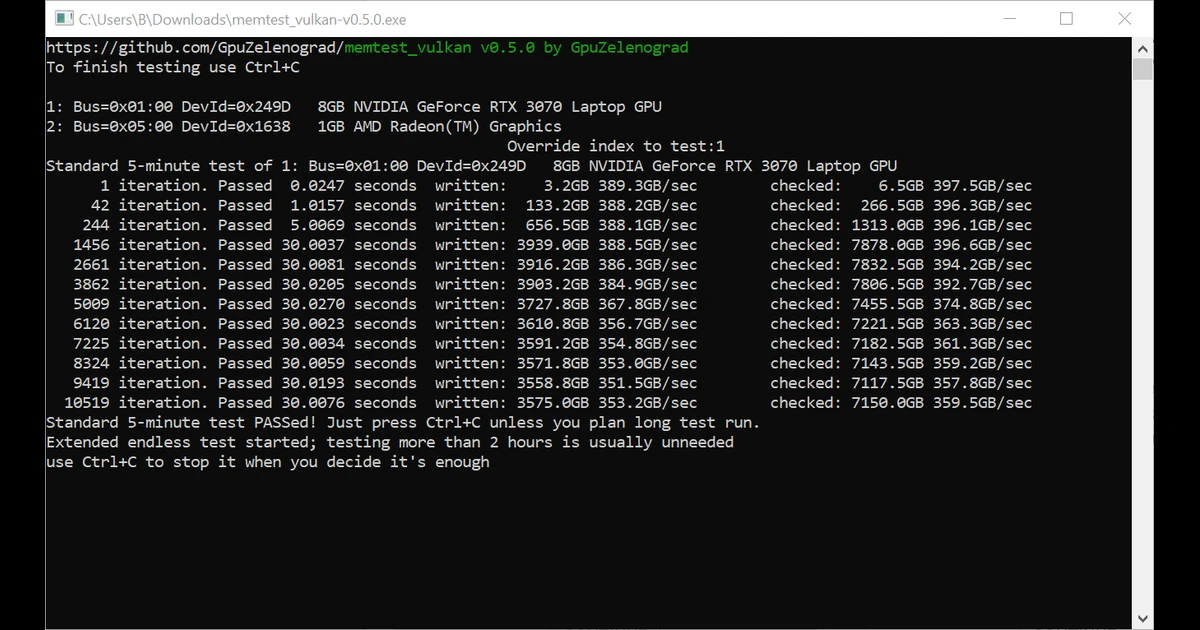
The screenshot shows:
- A system with an NVIDIA GeForce RTX 3070 Laptop GPU and an integrated AMD GPU.
- Iterations of memory tests passing at very high throughput (350–397 GB/s).
- A 5-minute standard test passed, after which an endless stress test began.
This ensures the GPU's VRAM can handle intensive workloads without producing errors.
Why Use Memtest Vulkan?
Memtest Vulkan is useful for several scenarios:
- Overclocking validation – If you overclock your GPU's core or memory, VRAM instability is one of the first problems you'll encounter. Memtest Vulkan can detect errors before they cause crashes in real workloads.
- Diagnosing hardware issues – Unexpected crashes, artifacting, or driver errors may be caused by faulty VRAM. Running this test can help confirm if your GPU hardware is failing.
- System stability testing – For AI researchers, 3D artists, and gamers, long stress tests ensure your GPU can handle sustained workloads without memory corruption.
- Cross-platform reliability – Because it's Vulkan-based, the tool works across different GPUs and operating systems, making it widely accessible.
How Long Should You Run It?
- 5 minutes is usually enough for a quick health check.
- 30–60 minutes is recommended for validating an overclock or diagnosing intermittent issues.
- 2+ hours is generally unnecessary unless you suspect deeper instability.
Final Thoughts
Memtest Vulkan is a lightweight but powerful utility that helps ensure your GPU memory is functioning correctly. Whether you're troubleshooting crashes, validating overclocks, or stress-testing a workstation, it's an essential tool to keep in your diagnostics toolkit.
For anyone working with gaming rigs, AI systems, or professional rendering machines, running a quick Memtest Vulkan session could save hours of frustration later.